A rchive Date
[ 03-09-2005 ]
Category
[ Information Technologies ]
sub-Categoy
[ Lotus ]
|
[http://www.databasejournal.com/features/mssql/article.php/3462011
Connect to Lotus Domino using SQL Server Linked Server
By Muthusamy Anantha Kumar aka The MAK
January 25, 2005
Many Enterprises create and maintain applications that reside on "IBM Lotus Domino Server." Since the Lotus Domino server has the capability of handling applications and messaging, it has become a prime requirement for a SQL Server DBA to cross- reference data or import and export data to and from the Domino database and SQL Server databases. In this article, I am going to discuss how to use SQL Server Linked server to connect to databases that reside on the Lotus Domino server. The steps involved in connecting to the Lotus notes mail server database can be used for connecting to other databases that reside in "Lotus Notes Domino" server.
Step 1
Install Lotus Notes Client on the SQL Server box. Like every heterogeneous linked server, we need to install the client portion of the heterogeneous database. In this case, it is the Lotus Notes client. (Refer to my article, "Linking SQL Server to Heterogeneous Systems."
After installing Notes Client, get the Login ID File from your system admin and copy that to the server. Try to login to Lotus Notes Client using the given ID and make sure you can access mail and data from other databases that resides in the Domino server.
Step 2
Download the latest "NotesSQL" ODBC driver for Domino server from http://www.lotus.com. In this article, I am using NotesSQL release 3.01.
Step 3
Install NotesSQL (ODBC Driver for Domino). Installation is pretty straightforward. [Refer to Fig 1.0]
 Fig 1.0
Step 4
The ODBC DSN setting using the NotesSQL Driver requires an authenticated list of users. This can be done using the NotesSQL Administrative tool. [Refer to Fig 1.1]
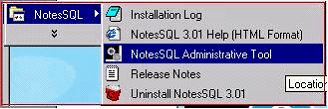 Fig 1.1
Use the NotesSQL Administration Tool to authenticate users as shown below. Point to the notes.ini file and point to the ID file given by your system admin. [Refer to Fig 1.2]
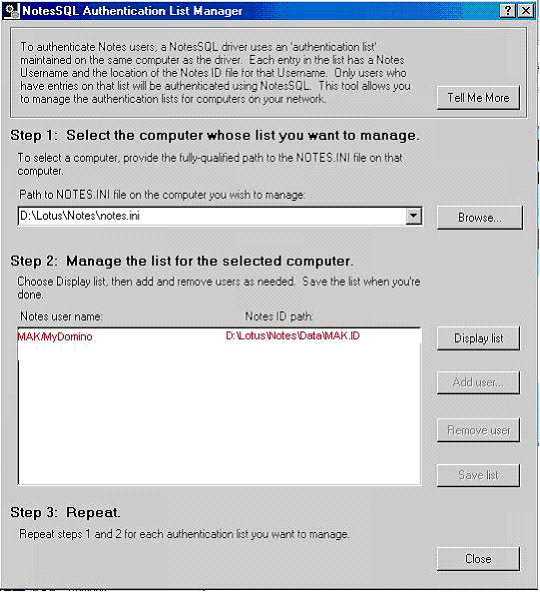 Fig 1.2
Step 5
Create the ODBC system DSN for the Lotus Domino server. [Refer to Fig 1.3]
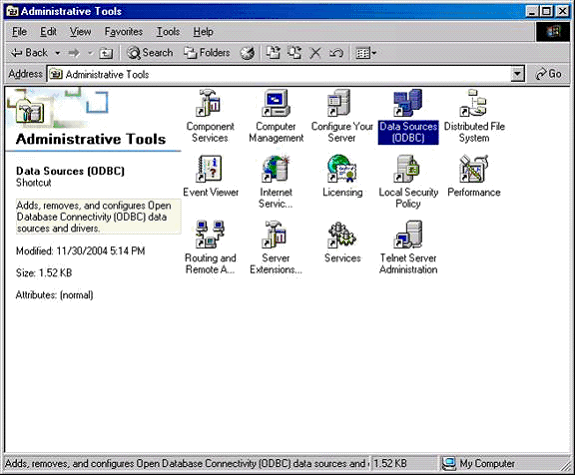 Fig 1.3
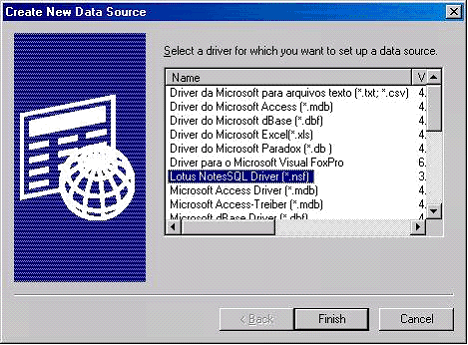 Fig 1.4
Now type the Source Name as "MyNotes," which we are going to use in Linked server. Type the Fully qualified Domino server name as shown. Please refer to Fig 1.5, if you are accessing the mail server database. Please refer to Fig 1.6 if you are accessing other application databases that reside in the Domino server.
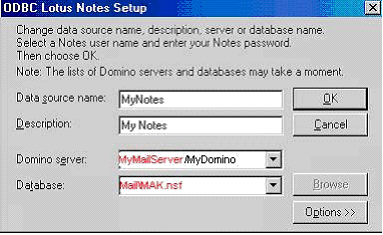 Fig 1.5
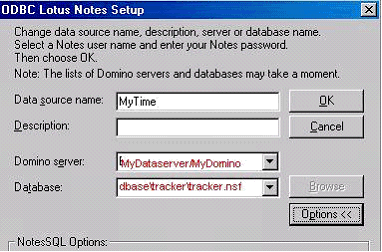 Fig 1.6
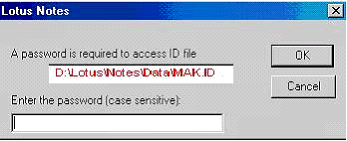 Fig 1.7
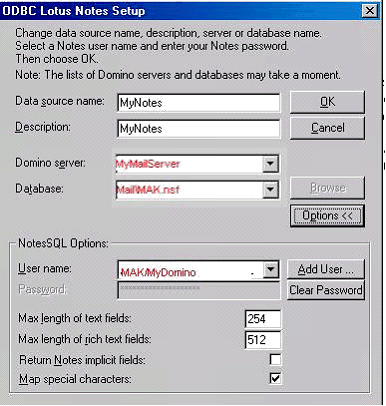 Fig 1.8
Step 6
Right click on the "Linked Server" tab in Enterprise manager and create the linked server. [Refer to Fig 1.9]
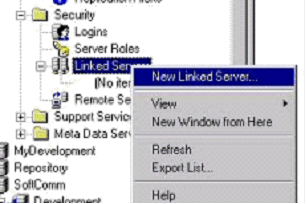 Fig 1.9
Click for larger image
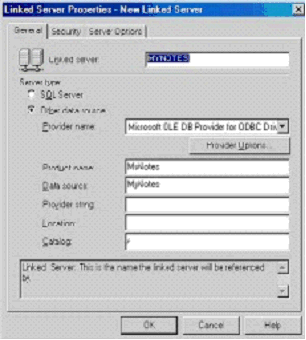 Fig 2.0
In the security tab, provide the fully qualified login name and password. [Refer to Fig 2.2]
"Sunny Leone/MyDomino"
"MAK/MyDomino"
If you provide only the login name and password that you use for other heterogeneous systems, such as Sybase and oracle, you get the ODBC error message below. [Refer to Fig 2.1]
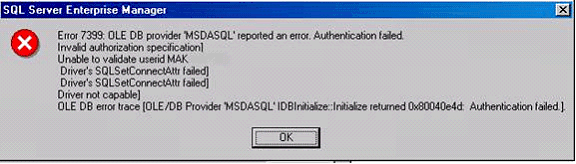 Fig 2.1
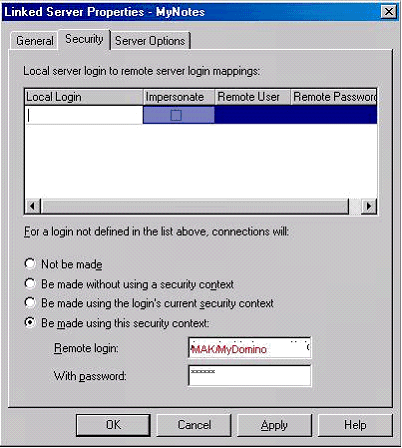 Fig 2.2
Check the necessary options in the server options tab. [Refer to Fig 2.3]
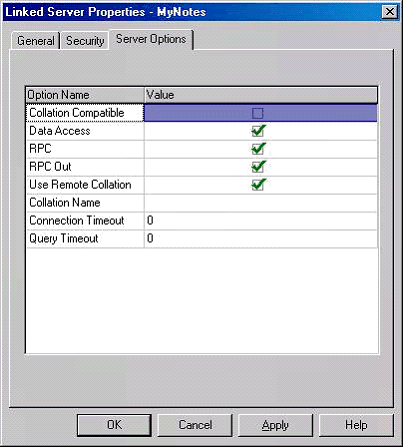 Fig 2.3
Now the Linked server to the Domino mail server is ready. All of the folders that you create in the mail server will show as Views in the Linked server as shown below. [Refer to Fig 2.4]
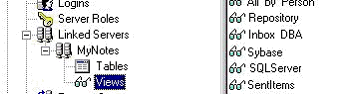 Fig 2.4
Now let's access the linked server "MyNotes" using the openquery statement as shown below.
select * from openquery(MyNotes, 'Select * from Repository')
The result looks like:
| Sunny Leone | 1/6/2005 14:46 | 1227 | SQL Server |
| MAK | 1/7/2005 16:26 | 1802 | FYI. |
| The MAK | 1/7/2005 16:36 | 2571 | notes |
| MAK | 1/7/2005 16:37 | 1648 | ODBC driver for Lotus Notes |
| MAK | 1/10/2005 10:24 | 2044 | Database login, password |
| Kate Winslet | 1/10/2005 17:24 | 1652 | Please send me details about |
| Kate Winslet | 1/10/2005 17:33 | 7421 | Re: Database login, password Pending |
| MAK | 1/12/2005 9:03 | 1612 | Discuss - Repository |
| MAK | 1/12/2005 10:25 | 2797 | Access to SQL Server XYZ123 |
| Kyle Smith | 1/12/2005 10:33 | 1509 | MyDomino |
| Sunny Leone | 1/12/2005 10:37 | 5399 | Re MyDomino |
| MAK | 1/12/2005 11:20 | 3838 | None |
| Sunny Leone | 1/12/2005 11:55 | 5700 | None |
| Sunny Leone | 1/12/2005 14:50 | 1882 | reboot done |
| MAK | 1/12/2005 15:17 | 1606 | Re: reboot done |
| Sunny Leone | 1/12/2005 15:27 | 57849 | Re: reboot done |
| MAK | 1/12/2005 15:52 | 3292 | Re: reboot done |
| MAK | 1/13/2005 12:45 | 1689 | Lotus notes access |
Conclusion
This article has provided a guide on how to create a SQL Server linked server that connects to IBM Lotus Domino databases.
» See All Articles by Columnist MAK ]
|