A rchive Date
[ 13-02-2002 ]
Category
[ Information Technologies ]
sub-Categoy
[ Microsoft ]
|
[http://msdn.microsoft.com/library/default.asp?url=/library/en-us/dn_voices_webservice/html/service02282001.asp?frame=true
Security Overview
Let's start by defining some terms. There are many aspects to security, for example authentication, authorization, auditing, data privacy, data integrity, availability, and nonrepudiation. In this article, we'll focus on authentication and authorization. (If you want to know more about the other aspects, check out Designing Secure Web-Based Applications for Microsoft Windows 2000).
Authentication is the process of verifying that someone (or something) is who they claim to be. The someone or something is known as a principal. Authentication requires evidence, known as credentials. For example, a client application could present a password as its credentials. If the client application presents the correct credentials, it is assumed to be who it claims to be.
Of course if your credentials are stolen, all bets are off—the authentication process can't tell that an imposter is presenting your credentials. Some credentials, like thumbprints, are hard to counterfeit; others, like passwords, are easier to counterfeit. So an important consideration in designing a secure Web Service is deciding what kind of credentials to accept.
Once a principal's identity is authenticated, authorization decisions can be made. Access is determined by checking information about the principal against some access control information, such as an Access Control List (ACL). It's possible for clients to have different degrees of access. For example, some clients may have full access to your Web Service, others may only be allowed to access certain operations. Some clients may be allowed full access to all data, others may only be allowed to access a subset of the data, others may have read-only access.
Authentication and Authorization Options
If you've looked at the SOAP specification, you'll know that it doesn't say anything about security. There is some work in progress to define supplemental specifications related to securing SOAP messages, for example the recently released SOAP Security Extensions: Digital Signatures specification. However, digital signatures alone do not define a complete authentication mechanism. So there's still work to be done on the SOAP security extensions front.
In the absence of standards for securing SOAP messages, we can fall back on the same techniques we would use to secure any other Web application. These techniques fall into three basic categories: system-level, third-party, and application-level.
System-Level Techniques
System-level techniques use operating system services to perform authentication and authorization. Microsoft Windows® 2000 supports several system-level authentication techniques.
If you know exactly which computers need to access your Web Service, you can use Internet Protocol Security (IPSec) port filtering policy or firewall rules to restrict access to computers of known IP addresses. This technique is particularly useful when you want to restrict access to computers in a private network. IPSec provides network-level authentication, data integrity, and encryption without any modifications to your Web Service or to client applications. For more information about IPSec, see IP Security for Microsoft Windows 2000 Server.
In most Internet scenarios, however, you will not know the IP addresses of all your clients. In this case, one straightforward approach to implementing authentication is to leverage the authentication features of the protocol used to exchange messages. For most Web Services, this means leveraging the authentication features available for HTTP. Microsoft Internet Information Server 5.0 (IIS) supports several authentication mechanisms for HTTP shown in the following table:
| Basic | Use for non-secure or semi-secure identification of clients, as username and password are sent as base64-encoded text, which is easily decoded. IIS will authorize access to the Web Service if the credentials match a valid user account. |
| Basic over SSL | Same as Basic authentication except that the communication channel is encrypted, thus protecting the username and password. A good option for Internet scenarios, however using SSL has a significant impact on performance. |
| Digest | Uses hashing to transmit client credentials in a secure way. However, may not be widely supported by developer tools for building Web Service clients. IIS will authorize access to the Web Service if the credentials match a valid user account. |
| Integrated Windows authentication | Useful primarily in Intranet scenarios. Uses NTLM or Kerberos. Client must belong to the same domain as the server, or belong to a trusted domain of the server's domain. IIS will authorize access to the Web Service if the credentials match a valid user account. |
| Client certificates over SSL | Requires each client to obtain a certificate. Certificates are mapped to user accounts, which are used by IIS for authorizing access to the Web Service. A viable option for Internet scenarios, although use of digital certificates is not widespread at this time. May not be widely supported by developer tools for building Web Service clients. Only available over SSL connections, thus performance may be a concern. |
The IIS 4.0 and 5.0 Authentication Methods Chart available on TechNet provides additional detail about each of these mechanisms.
From a Web Service implementer's perspective, one nice benefit of using any of these authentication mechanisms is that no code changes are required in the Web Service—IIS performs all the authentication and ACL authorization checks before your Web Service is called. There is some configuration work to do, however. In particular, you will need to create Windows 2000 accounts for each client allowed to access the Web Service and configure ACLs appropriately on the resources that make up your Web Service.
You should, however, consider the capabilities of client applications before selecting one of these authentication mechanisms. The client application will need to respond to server requests for authentication credentials. Ideally this would be handled automatically by developer tools for building Web Service clients, but not every tool supports every authentication mechanism. Without tools support, the client application developer will need to implement code to respond to requests for credentials. At the end of this column, you'll find a chart showing which authentication mechanisms are supported by Microsoft developer tools.
Third-Party Techniques
Another approach is to rely on a third-party to provide authentication services. There are a variety of products on the market that provide authentication services. For example, Microsoft Passport is a service that Web application developers can use to authenticate customers. Most people are probably familiar with Passport as a way to authenticate end users, rather than applications, computers, or businesses. However, there's nothing to prevent your customers from obtaining a passport that represents an application or their business.
The biggest obstacle to using Passport as your authentication mechanism for application-to-application communication is lack of developer tools support. The only Web Service development tool we know supports Passport is ASP.NET, which is part of the Microsoft .NET Framework. However, even ASP.NET does not provide any support to help client applications pass Passport credentials on to your Web Service. Each client application would need to implement its own code for that.
While tools support is likely to improve in the future, that doesn't help you today. If you choose to use Passport or any other third-party authentication service to restrict access to your Web Service, be prepared to do a bit more work to help client application developers get their applications connected to your service.
Application-Level Techniques
The chief advantage of system-level and third-party techniques is that someone else has written the code—and presumably tested it to make sure there aren't bugs that nefarious users can exploit to attack your system. However, there may be situations where the techniques described above aren't suitable. For example, you may have a custom database of user account information. Instead of creating Windows user accounts for every user, you'd just like to use your existing database. Or your access check may depend on data only known to your application at runtime.
In these situations, you can implement a custom authentication mechanism. For example, if you are sending SOAP messages, you can define your Web Service contract so that client credentials are passed in the SOAP message itself. With this approach, you need to retrieve the credentials from the message and implement your own authorization logic, but you can use any kind of client account database you want. There are a couple ways you can pass client credentials in a SOAP message:
- Include credentials (username and password) as a SOAP header
- Include credentials as elements in the SOAP body
Remember, however, that SOAP messages are XML. So if you are using HTTP to send the messages, the username and password will be passed in clear-text with nice helpful tags like <username> and <password> to help attackers know what to look for. To avoid sending the credentials in clear-text, you could use SSL instead of HTTP for every message. Note that SSL is significantly slower than HTTP alone, so you should carefully weigh the tradeoffs between security and performance.
With some advance planning, it's possible to use SSL for some operations provided by the Web Service and more lightweight techniques for operations where security is less critical. For example, you could use the SOAP RPC conventions and define a special "logon" operation on your Web Service that accepts credentials as elements of the SOAP body and returns a session key. Only the logon method would need to be sent over SSL. Other messages could be sent over HTTP, including the session key, either in the SOAP header or the SOAP body. This approach runs the risk that the session key will be hijacked, but reduces the risk that a client's password will be stolen.
ASP.NET supports another application-level authentication mechanism based on HTTP cookies. This technique passes a session key around in a cookie, instead of in a SOAP message. ASP.NET provides infrastructure for validating credentials against a user database and generating the session keys, as well as support for interpreting session keys on incoming requests. For more information, see the .NET Framework SDK documentation.
Selecting a Security Model for Favorites
When we started thinking about how we would implement security for the Favorites Service, we defined five main criteria related to authentication and authorization:
1. Customer passwords must not be transmitted as clear-text.
2. User favorites data may be transmitted as clear-text.
3. Assuming a customer username and password are not stolen, it's sufficiently difficult to counterfeit valid customer credentials
that it's unlikely anyone would bother to try.
4. It must be reasonably straightforward to implement the selected authentication mechanism using the developer tool we select to
implement the Web Services. For example, we should not need to write code to parse SOAP messages and dispatch requests to
component methods.
5. It must be reasonably straightforward to implement a client application that accesses our Web Service using a variety of
developer tools. For example, the client application should not need to implement code to construct
SOAP messages or send and receive HTTP messages.
With the exception of the ease-of-implementation issue for creating the Web Service, these are all part of the security policy defined in our functional spec. (Remember that our customers are the development organizations that license the Favorites Service, not end users.)
We then evaluated each of the techniques described above against these criteria.
Basic authentication over HTTP transmits passwords as clear-text, so we eliminated that straightaway. On the other hand, using basic authentication over SSL for every method call seemed like overkill—it's ok if user favorites data is transmitted as clear-text. If we were storing medical or financial records, we probably would have given strong consideration to using this technique.
Using Digest, Integrated Windows Authentication, or client certificates would cause problems for some clients. We could eliminate Integrated Windows Authentication because we can not rely on trust relationships between client and server domains. At the time we did the evaluation, the primary toolsets available from Microsoft were the SOAP Toolkit 1.0, ASP.NET Beta 1, and ATL Server. The SOAP Toolkit 1.0 doesn't support digest authentication and ASP.NET doesn't support client certificates. So even without looking at non-Microsoft tools, neither digest nor client certificates looked like a viable option.
Using Microsoft Passport would cause even more difficulty for clients. No tools that we are aware of help client application developers pass Passport credentials to Web Services. Each client would need to use the Passport SDK and figure out how to implement support for the Passport logon protocol. As much as we wanted to use Passport as the authentication mechanism, it just didn't meet our criteria. (We plan on using Passport as the authentication mechanism in a future sample, though.)
That left us with an application-level approach to authentication. Because we didn't want customer passwords transmitted in clear-text, simply adding a couple parameters to each operation supported by the Favorites Web Service wouldn't be sufficient. So we elected to implement a special logon method called over SSL that returned a logon key. Every other operation supported by the Favorites Web Service could be called over HTTP and would take the logon key as the first parameter.
Another option would have been to use basic authentication over SSL for the logon method, rather than passing parameters to the method itself. However, recall that basic authentication uses Windows user accounts. The secured resources our Web Service uses are records in a database that do not have individual integrated security descriptors. Thus at some level we would need to make the translation between the Windows user account authenticated by IIS and whatever mechanism we used to identify accounts in our database. This would probably mean two parallel lists of valid accounts that would need to be kept in sync. But the parameter approach works just fine, using with a single application-specific licensee account database.
Implementing Security in Favorites
The following figure highlights the authentication and authorization subsystem in the Favorites Service:
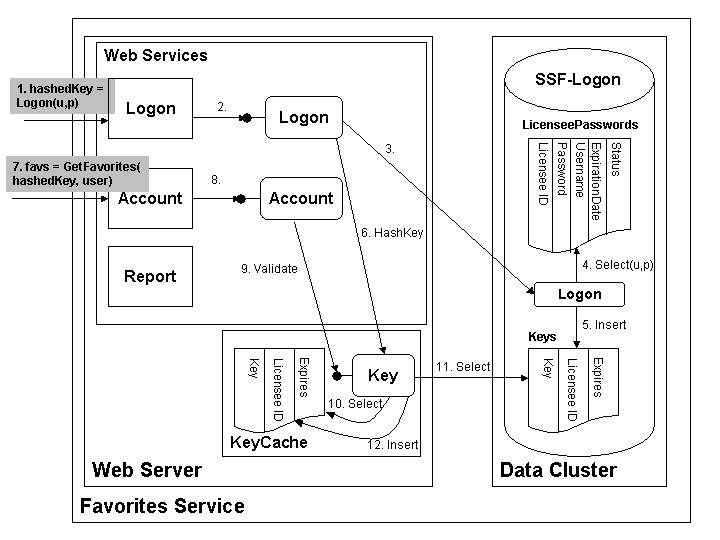
Figure 1. Favorites Service authentication and authorization design
The primary functionality of the Favorites Service is implemented in two Web Services, Account (which deals with user favorites management) and Report. We implemented a separate Web Service, Logon, to handle logon requests. Our Web Services are implemented using the SOAP Toolkit 2.0, so each Web Service maps incoming requests to methods on a corresponding COM class. With the SOAP Toolkit 2.0, all SOAP requests for a particular Web Service are routed to a single URL. Since we want to require SSL for logon requests and accept regular HTTP requests for all other operations, and the finest granularity at which SSL can be enabled through IIS is the URL level, the logon request must be handled by a separate Web Service.
If a client application wants to use the Favorites Service, it starts by sending a logon request to the Logon Web Service over SSL(1). This request is dispatched to the Logon method of a Logon COM object (2). The Logon method takes a username and password as input and returns a hashed logon key, which gets passed back to the client application (shown as hashedKey in the figure).
The client application then passes hashedKey as the first parameter of each request to the Account or Report Web Services (7). These requests are dispatched to corresponding methods on an Account or Report COM object (8). Each method verifies the hashedKey parameter is a valid key and retrieves the licensee ID corresponding to the key (9). If the key is valid, then the method continues on with its work. (For those of you who've been following the series, the Account Web Service was called the Favorites Web Service in previous articles. In the actual implementation it's called the Account Web Service, so we might as well start getting used to the name now.)
One potential problem with this technique is if hashedKey is hijacked. Anyone who gains access to a hashedKey belonging to a licensee can make calls to the Favorites Service and get access to the data associated with the licensee. To reduce exposure to this sort of attack, logon keys expire after 60 minutes. After the key expires, the client application must make another logon request to get a new key. The expiration period was chosen as a reasonable compromise between security and usability. The client application can detect that its key has expired by watching for SSF_ERROR_INVALID_KEY errors, which are propagated back to the client as SOAP faults.
Information about licensees required to process logon requests is stored in the LicenseePasswords table of the SSF-Logon database. This table is a subset of the full licensee information, which is stored in a separate database. The SSF-Logon database also contains a Keys table, which maps logon keys to licensee IDs and keeps track of when the keys expire. To reduce load on the SSF-Logon database, portions of the Keys table are cached on each Web server in the Web farm hosting the Favorites Web Services. The KeyCache is implemented as a Windows service and exposes a COM class, Key, that is used by Logon, Account, and Report objects to calculate and verify hashed keys. We periodically remove expired keys from both the Keys table and the KeyCache.
hat happens when the Logon.Logon method is called. Most of the business rules for logging on are actually implemented in a stored procedure in the SSF-Logon database named (what else?) Logon (3). The pseudocode for the Logon stored procedure looks like this:
Procedure Logon([in]username, [in]password, [out]key, [out]licenseeID)
Key = null, licenseeID = 0
Locate record in LicenseePasswords with username, password (4)
If not found,
Return error SSF_ERROR_BAD_CREDENTIALS
Else If license has expired,
Return error SSF_ERROR_LICENSE_EXPIRED
Else If license status is not Active,
Return appropriate error
Else
Generate a new key
Retrieve licenseeID from LicenseePasswords record
Insert new record into Keys table
with expiration set 60 minutes from now (5)
If insert record failed,
Return error SSF_ERROR_COULD_NOT_CREATE_KEY
End Procedure
This should be fairly self-explanatory, so I'll just point out a couple things. First, it's valid for a licensee to log on concurrently multiple times. For example, if the client application is installed on a Web farm, the application would log on from each machine in the Web farm. In addition, the licensee might have multiple applications that use the Favorites Service, so there may be multiple records in the Keys table for the same licenseeID.
Second, the keys generated by the stored procedure are UUIDs. On Windows 2000, UUIDs cannot be traced back to a particular machine, MAC address, etc. – they are essentially 128-bit random numbers. So these keys would be difficult to guess.
When the Logon stored procedure returns, the Logon.Logon method continues by creating a Key object and calling its HashKey method (6). The HashKey method uses the Windows Cryptography APIs to compute a hashed key of the form
UuidToString(key) & Hex(Hash(key, secret))
where Hash(key, secret) computes a cryptographic hash and Hex(n) computes a string representation of number n in hexadecimal notation. The value returned by Key.HashKey is returned to the client application.
Now, let's look at what happens when a method on the Account or Report classes is called. Each method has the same basic structure:
Public Sub Method(ByVal hashedKey As String,…)
nErrorCode = 0
Initialize an audit log object
Verify hashedKey is a valid key & retrieve the licenseeID (9)
If valid,
Validate method specific input parameters
Do method specific work
Update audit log object with result of work
Else
nErrorCode = SSF_ERROR_INVALID_KEY
Save the audit log object
If nErrorCode <> 0,
ReportError nErrorCode
End Sub
We've already discussed why SSF_ERROR_INVALID_KEY is returned, so the interesting thing to look at is how hashedKey is verified. Both classes use a helper function to create a Key object and call its Validate method (9), which takes a hashed key as input and returns the corresponding licensee ID if the key is valid. If value of 0 is returned, the key is not valid. In pseudocode form, Validate looks like this:
Public Function Validate(hashedKey as String) as Long
Validate = 0
Set key = original logon key substring at beginning of hashedKey
If Hash(key, secret) = remainder of hashedKey,
Look for record corresponding to key in KeyCache (10)
If found,
If key has not expired,
Validate = licensee ID in KeyCache record
Else
Delete record from KeyCache
Else
Look for record in SSF-Logon.Keys table corresponding to
key and not expired (11)
If found,
Add record to KeyCache (12)
Validate = licensee ID in record found
End Function
The first thing we do is verify that hashedKey appears to be valid. If it is, we look for the key in the KeyCache (10). Only if the key isn't found in the KeyCache do we query the database for the key (11).
You might be wondering why we go to all this trouble to hash the key on logon and validate the hash on each method call. After all, a randomly generated UUID seems like a pretty hard-to-guess logon key. However, consider what would happen if an application submited a request with an invalid key. We'd look for the key in the KeyCache and wouldn't find it. Then we'd query the SSF-Logon.Keys table for the key. Every time a request was submitted with an invalid key, we'd hit the database. It would be pretty easy to initiate a denial of service attack by simply making lots of service requests with invalid keys.
By appending a hash of the original logon key to the key we return to the client application, we have a way to filter out most truly invalid keys without hitting the KeyCache, let alone the database. It would be extremely difficult to guess a hashedKey that would pass the test shown in the Validate pseudocode.
That's really all there is to our authentication and authorization subsystem. If valid credentials are provided when an Account or Report operation is called, the calling application is authorized to perform that operation. However, it may only access user favorites or report data that is associated with the licensee ID retrieved by Key.Validate.
Conclusion
Restricting access to a Web Service isn't all that different from restricting access to any other Web site. However, client applications calling your service may not be able to display any user interface to retrieve logon credentials. Developers of those client applications may not have a way to stuff the credentials you need into the messages sent to your service. Your Web Service will be most accessible to authorized client applications if you select an authentication mechanism supported by the developer tools your customers use.
Our experience with the Favorites Service shows that it's reasonably straightforward to implement application-level authentication and authorization by passing client credentials in the body of your SOAP requests. You'll probably want to implement the authentication and authorization subsystem early on to maximize testing time. You should also have a security guru review your system to see if you are vulnerable to attack. (That's how we caught the denial of service attack issue mentioned earlier.)
Of course authentication and authorization are only a part of a complete security solution. We expect to provide additional information about the complete security story for the Favorites Service around the time we release the sample code. In the meantime, see the Internet Information Services 5.0 documentation for more information about securing your Web server. For a complete, end-to-end look at securing Web applications based on Windows DNA technologies, I highly recommend the MSPress book Designing Secure Web-Based Applications for Microsoft Windows 2000.
Next week, we'll turn our attention to an easily overlooked source of requirements on Web Services: the developers, testers, and operations staff of Web applications that use your services. What kinds of documentation and tools do these groups of people need to use your services successfully? We'll look at the questions you should ask to elicit requirements, the requirements we identified for our Favorites Service, and the impact those requirements have had on our project.
Microsoft Tools Support
The following tables show built-in Microsoft tools support for the authentication mechanisms discussed in this article. Client-side support means that the proxies generated by the tools automatically generate the correct HTTP messages to pass credentials to the Web Service. Server-side support means that the Web Service listener infrastructure supplied by the tool automatically authenticates credentials on incoming requests.
Client-side support for authentication mechanisms
| Authentication mechanism | ASP.NET (Beta 1) | ATL Server (Beta 1) | SOAP Toolkit 2.0 (Beta 2) | SOAP Toolkit 1.0 (Dec Release) |
| Basic | Yes | Yes | Yes | Yes |
| Basic over SSL | Yes | Yes | Yes | Yes |
| Digest | Yes | Yes | Yes | No |
| Integrated Windows authentication | Yes | Yes | Yes | NTLM only |
| Client certificates | No | Yes | Yes | Yes |
| Microsoft Passport | No | No | No | No |
| Cookie-Based authentication | Yes | No | No | No |
Server-side support for authentication mechanisms
| Authentication mechanism | ASP.NET (Beta 1) | ATL Server (Beta 1) | SOAP Toolkit 2.0 (Beta 2) | SOAP Toolkit 1.0 (Dec Release) |
| Basic | Yes1 | Yes1 | Yes1 | Yes1 |
| Basic over SSL | Yes1 | Yes1 | Yes1 | Yes1 |
| Digest | Yes1 | Yes1 | Yes1 | Yes1 |
| Integrated Windows authentication | Yes1 | Yes1 | Yes1 | Yes1 |
| Client certificates | Yes1 | Yes1 | Yes1 | Yes1 |
| Microsoft Passport | Yes2 | No | No | No |
| Cookie-Based authentication | Yes | No | No | No |
1. Authentication is performed by IIS. No additional support is required in the tool.
2. Microsoft Passport SDK must be installed and service provider must have a Passport site ID.]
|